


 Share New Research


Over the last few months, agentic AI has moved from simple code completion to complete workflow automation. Through better models, tools, and feedback loops, AI can now automate full processes. For quantitative research, a useful AI system needs to inspect data, run notebooks, read logs, evaluate backtests, search market news, store outputs, notify a human, and hand work to the next specialist in the process.
Today we are launching the next steps in QuantConnect AI - Assistants. A platform for designing custom agentic AI, forming teams of AI that can collaborate, and a visual flow to manage bringing this work to production called the Research Pipeline. Together, they let you design a repeatable research process and assign AI agents to each stage of it.
Research Workflows
QuantConnect Assistants are specialized agents that work inside the QuantConnect platform. They can be assigned to specific parts of your investment workflow: sourcing ideas, researching signals, validating models, writing algorithms, analyzing backtests, paper testing, and monitoring live deployments.
These agents have access to platform tools depending on the permissions you grant, they can work with project files, execute Jupyter notebook cells, read backtest and live logs, search financial news, use datasets, write to the Object Store, and send email, SMS, or Telegram notifications.
Instead of asking an AI to "think about a strategy," you can assign it a full problem to solve, which changes how you interact with AI. It can handle a full process - research a task, document the result, and if the evidence supports it, continue to backtesting and paper trading.
Research Pipeline
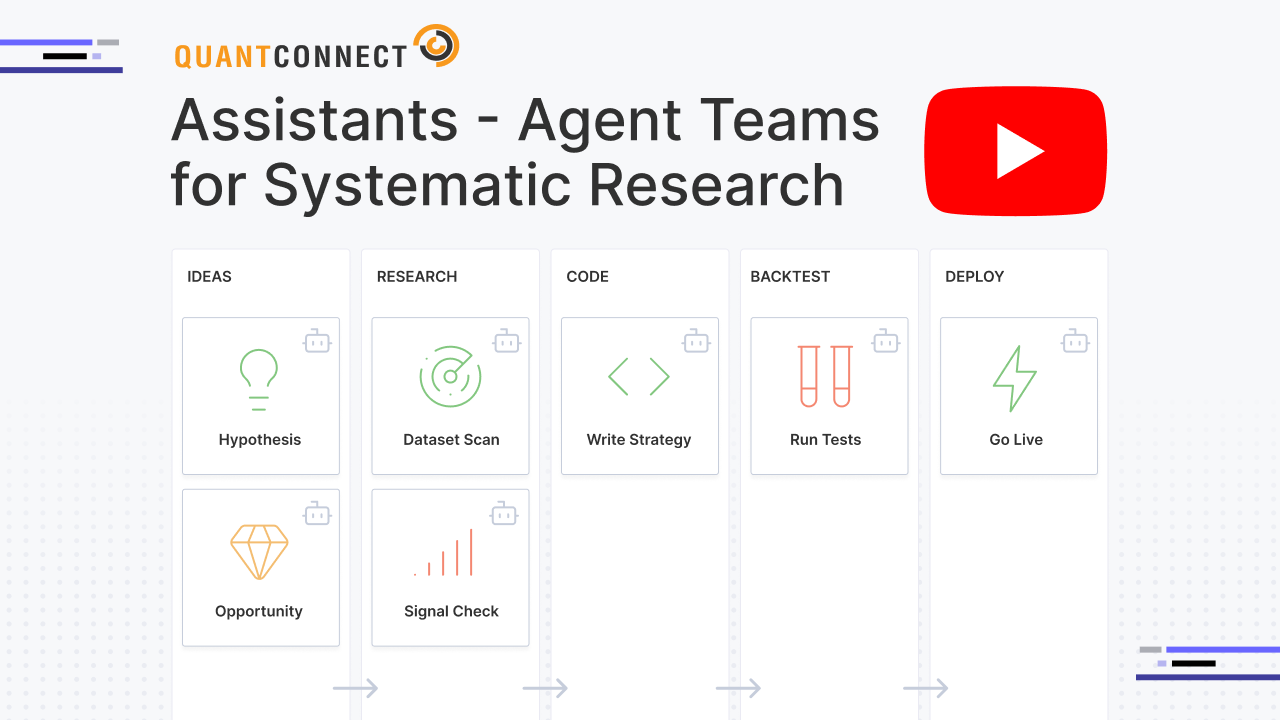
The Research Pipeline gives strategy development a visible, disciplined, stage-based workflow based on traditional kanban project management. Using kanban gives you a 10,000-ft view of your research pipeline, letting you manage your agents and supervise the ideas they bring to production. Projects are automatically moved through the kanban flow as the assistants perform work on them. The pipeline columns: Ideas, Research, Backtesting, Paper Trading, and Live each have associated AI-Assistants with specifically designed tooling and scripts to emulate a full trading firm research process.
Jupyter Research, Now Agent-Driven
A major upgrade in this release is full support for agentic Jupyter Research Notebooks.
Assistants can now create, edit, and execute notebook cells. They can generate charts, run longer research jobs, inspect intermediate results, and document the work in a format a quant researcher can audit later. Special attention was paid to controlling the size of the AI context, to ensure they remain intelligent to solve difficult challenges.
The AI Research Assistant works inside our hosted Jupyter notebooks to pull data, transforms variables, evaluates candidate models, and produces a research notebook with the assumptions, charts, diagnostics, and conclusions. The Research Validation Assistant then acts as a critical opinion, testing whether the statistical foundation is strong enough to continue.
We worked with Dimitri Bianco of Fancy Quant to sharpen this research process around the standards a professional quant team would expect: documented assumptions, explicit diagnostics, and clear pass/fail reasoning rather than vague model commentary.
Custom Assistants and Workflows
You can create custom assistants with your own instructions, tools, model settings, and output schemas. That lets an investment team map assistants to its actual research process: signal intake, notebook research, statistical validation, backtest implementation, paper-trading review, or live monitoring.
For example:
- Idea generation: deploy the Ideas Assistant to scan market news and research, then write concrete, testable strategy ideas into the Research Pipeline.
- Private signal research: create an assistant that pulls signals from your proprietary source, runs notebook-based analysis, stores approved artifacts in the Object Store, and emails a report when results pass your filters.
- Research validation: assign a critic assistant to review assumptions, diagnostics, statistical strength, and failure modes before a strategy advances to backtesting.
- Live monitoring: deploy the Live Monitoring Assistant to review active holdings against recent news and alert you when material risks appear.
Custom assistants can also return structured JSON outputs, making them easier to connect to downstream systems, other assistants, or your internal research infrastructure.
Assistant Teams
The biggest leap in the technology is that Assistants can now work in teams.
A single general-purpose agent can do a lot, but it also has to carry too much context. Research notes, model diagnostics, algorithm code, backtest results, live logs, and market news all compete for the same working memory.
Assistant Teams solve this by splitting the work across specialists. We've created a chatroom for AI to chat with each other to coordinate work. We created a project manager, "Conductor" to coordinate the workflow, passing work from one assistant to the next. Teams can be configured as chains, where each assistant runs in a fixed sequence, or as callable networks, where one assistant can call another specialist when needed.
That makes it possible to build workflows like:
Ideas → Research → Research Validation → Backtest → Paper Trading → Live Monitoring
These workflows can be built from QuantConnect's predefined assistants or from assistants customized to your process. Custom assistants can extend the same framework to proprietary signals, internal datasets, and firm-specific approval criteria.
Assistant Nodes
Assistants run on long-running QuantConnect cloud servers called Assistant Nodes.
Assistant Nodes determine how many assistant tasks can run concurrently and how much compute is available for larger workflows. The free A-MICRO node includes one agent and a 100K-token monthly cap. Paid Assistant Nodes remove the token cap and provide larger configurations, including nodes designed for multiple concurrent agents.
We are intentionally pricing these as fixed-cost infrastructure rather than metered token consumption. That gives teams predictable costs and aligns our incentives with yours: better prompts, better tools, and more efficient agent workflows.
You can get started with the free A-MICRO node, or add a paid Assistant Node from the organization resources page.
Built for Quant Research, Not Generic Automation
QuantConnect Assistants are not generic LLMs applied to finance. Our team has gone to great lengths to make them highly performant at solving common QuantConnect challenges. We've invested heavily in upgrading our compiler, interpreting backtests and optimizations, and equipping the AI with full access to data it needs. We've upgraded our notebooks to return syntax errors so they help the AI write even better code. You can even schedule assistants to run on market hours, and skip market holidays.
We're sharing the infrastructure we wanted for our own research publications: AI agents with access to the actual tools, data, and execution environments required to do quantitative work.
Research Pipeline, Custom Assistants, and Assistant Teams are available now in QuantConnect.


Jared Broad
The material on this website is provided for informational purposes only and does not constitute an offer to sell, a solicitation to buy, or a recommendation or endorsement for any security or strategy, nor does it constitute an offer to provide investment advisory services by QuantConnect. In addition, the material offers no opinion with respect to the suitability of any security or specific investment. QuantConnect makes no guarantees as to the accuracy or completeness of the views expressed in the website. The views are subject to change, and may have become unreliable for various reasons, including changes in market conditions or economic circumstances. All investments involve risk, including loss of principal. You should consult with an investment professional before making any investment decisions.
To unlock posting to the community forums please complete at least 30% of Boot Camp.
You can continue your Boot Camp training progress from the terminal. We hope to see you in the community soon!