


 Share New Research


Hello,
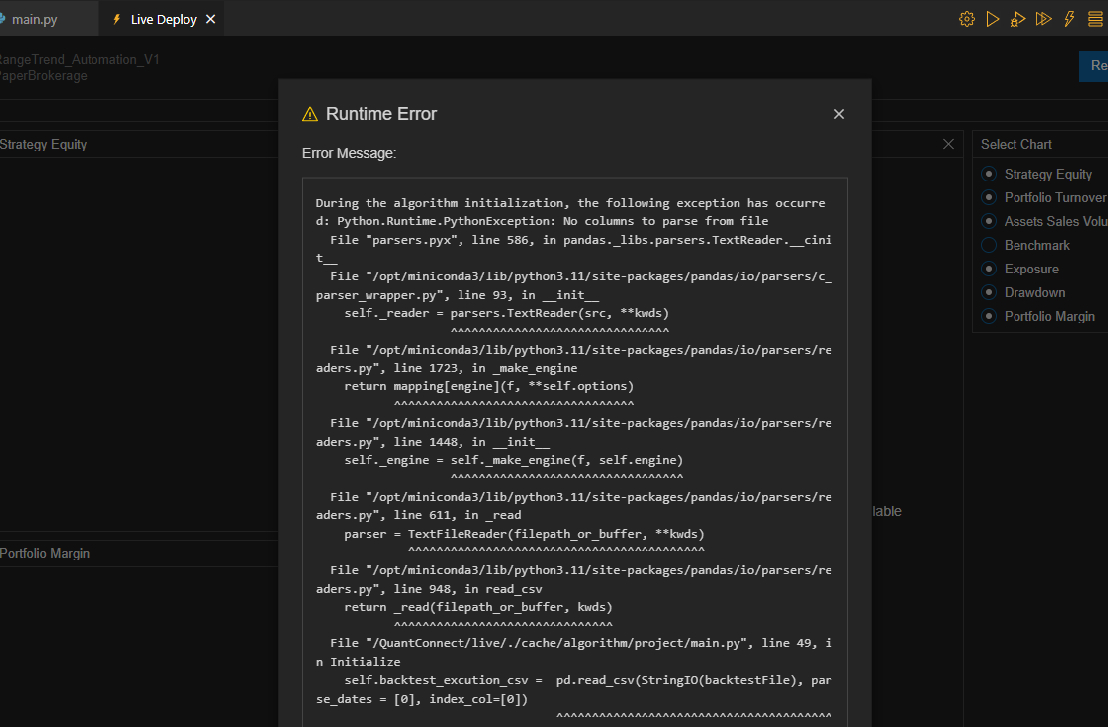
if someone can help this issue that would be very helpful…In backtest node, it can read csv file by using the following commands:
backtestFile = self.Download('FILE_LOCALTION')
self.backtest_excution_csv = pd.read_csv(StringIO(backtestFile), parse_dates = [0], index_col=[0])
However, while putting it to the paper trade, one issue raised..
Anyone know what's wrong with it?


Mia Alissi
It seems like 'WhiteTiger' is encountering an issue when trying to use the same method to read a CSV file in a paper trading environment that worked in a backtesting environment. The issue might stem from differences in how data is accessed or permissions in the live trading environment compared to the backtesting environment.
In backtesting, the
self.Downloadmethod is used to fetch data from a specified location, which is then read into a pandas DataFrame. This process works well in backtesting because the backtesting environment has access to external URLs and can download files directly.However, in a live or paper trading environment, accessing external files or URLs directly might not work the same way due to security, performance, or sandboxing reasons. The environment might restrict direct internet access to prevent unintended operations or to maintain the integrity and security of the trading algorithm.
To resolve this issue, 'WhiteTiger' could consider the following approaches:
Use QuantConnect's Data Library: Instead of relying on external CSV files, consider using the data already available through QuantConnect's data library. This ensures compatibility and accessibility across both backtesting and live trading environments.
Custom Data Source: If the data in the CSV is unique and not available through QuantConnect's data library, consider implementing a custom data source. This involves creating a class that inherits from
QuantConnect.PythonDataand overrides theGetSourceandReadermethods to specify how to fetch and parse the data. For live trading, the data source should be accessible in a way that's compatible with the live environment, possibly by placing the data in a location that the algorithm can access without direct internet downloads.Review File Access Permissions: If the method should technically work in a live environment but doesn't, it's worth reviewing the file access permissions and ensuring that the live trading environment is configured to allow access to the file location.
Debugging and Logs: Utilize logging within the algorithm to capture more details about the failure. This can provide insights into whether the issue is with accessing the URL, reading the file, or parsing the data.
Here's a simplified example of how to implement a custom data source for a CSV file:
And then add it to your algorithm:
Remember, for live trading, the data file needs to be in a location that's accessible by the algorithm, which might require adjustments compared to the backtesting setup.
The material on this website is provided for informational purposes only and does not constitute an offer to sell, a solicitation to buy, or a recommendation or endorsement for any security or strategy, nor does it constitute an offer to provide investment advisory services by QuantConnect. In addition, the material offers no opinion with respect to the suitability of any security or specific investment. QuantConnect makes no guarantees as to the accuracy or completeness of the views expressed in the website. The views are subject to change, and may have become unreliable for various reasons, including changes in market conditions or economic circumstances. All investments involve risk, including loss of principal. You should consult with an investment professional before making any investment decisions.
WhiteTiger
The material on this website is provided for informational purposes only and does not constitute an offer to sell, a solicitation to buy, or a recommendation or endorsement for any security or strategy, nor does it constitute an offer to provide investment advisory services by QuantConnect. In addition, the material offers no opinion with respect to the suitability of any security or specific investment. QuantConnect makes no guarantees as to the accuracy or completeness of the views expressed in the website. The views are subject to change, and may have become unreliable for various reasons, including changes in market conditions or economic circumstances. All investments involve risk, including loss of principal. You should consult with an investment professional before making any investment decisions.
To unlock posting to the community forums please complete at least 30% of Boot Camp.
You can continue your Boot Camp training progress from the terminal. We hope to see you in the community soon!