AI Assistance
Agent Teams
Introduction
Agents are most powerful when they work together. Instead of asking a single agent to research, code, backtest, and monitor a strategy all at once, you can assemble a team of specialists and let each one focus on the part of the workflow it was built for. The Conductor sits at the top of that team and keeps the work moving from one specialist to the next, so you never have to manually pass an idea between agents yourself.
Why Work in Teams
The most practical reason for Agent teams is context. Every agent has a finite working memory, and the more it has to hold in mind at once (the research, the code, the backtest results, the live diagnostics), the slower and less reliable it becomes. Splitting the workflow across specialists means each agent only carries the context it actually needs to do its part. The Research Agent does not need to know how the Paper Testing Agent instruments orders, and the Backtest Agent does not need to remember every correlation matrix from the research stage. The handoff itself is the compression: a clean brief moves between specialists while the noise stays behind.
The second reason is expertise. A specialist that only does one thing can be tuned harder for that thing, resulting in better defaults, sharper instincts, fewer distractions. Five focused agents outperform one generalist trying to remember which mode it is supposed to be in.
The third reason is parallelism. One generalist agent can only work on one project at a time, leaving every other project waiting its turn. A team of specialists runs in parallel across the portfolio. The Ideas Agent can draft tomorrow's research on one project while the Backtest Agent compiles yesterday's idea on another and the Live Monitoring Agent watches a third in production.
System Prompts
Every agent on your team is shaped by a system prompt that defines what it does, how it does it, and where its responsibilities end. The prompt is what turns a general-purpose model into a Research Agent, a Backtest Agent, or a Live Monitoring Agent. It sets the objective, names the tools the agent is allowed to reach for, and lays out the conventions the agent should follow when it writes code or reports results. You can use the agents QuantConnect ships out of the box, customize the prompts to match the way your team already works, or write entirely new agents when you have a workflow we have not covered. The prompt is the contract between you and the agent. If you change the prompt, you change the behavior.
Agent Chains and Mesh
There are two ways to wire a team of agents together, and each one fits a different kind of work.
An Agent Chain is a linear pipeline. Work moves from one specialist to the next in a defined order, with each agent picking up where the previous one left off. For instance, the Research Agent hands off to the Research Validation Agent, which hands off to the Backtest Agent, which hands off to the Paper Testing Agent. Chains are easy to follow, easy to audit, and well suited to workflows where the stages have a natural sequence and the output of one stage is the input of the next.
An Agent Mesh, sometimes called a Cluster, is more flexible. Instead of a fixed line, one agent (usually the Conductor), keeps a roster of callable specialists and decides which ones to invoke based on what the request needs. The path through the team is decided in flight rather than baked into the wiring. This hub and spoke design fits work that is less linear by nature, where the hub treats its sub-agents like tools it can call when needed.
How the Team Communicates
Agents talk to each other through messages. Every conversation with an agent lives in its own thread, so you can see exactly what was asked, what was answered, and what was handed off. When the Conductor routes work to a sub-agent, it opens a conversation with that specialist and waits for results to come back, the same way a human team lead would email a teammate and then move on to other work.
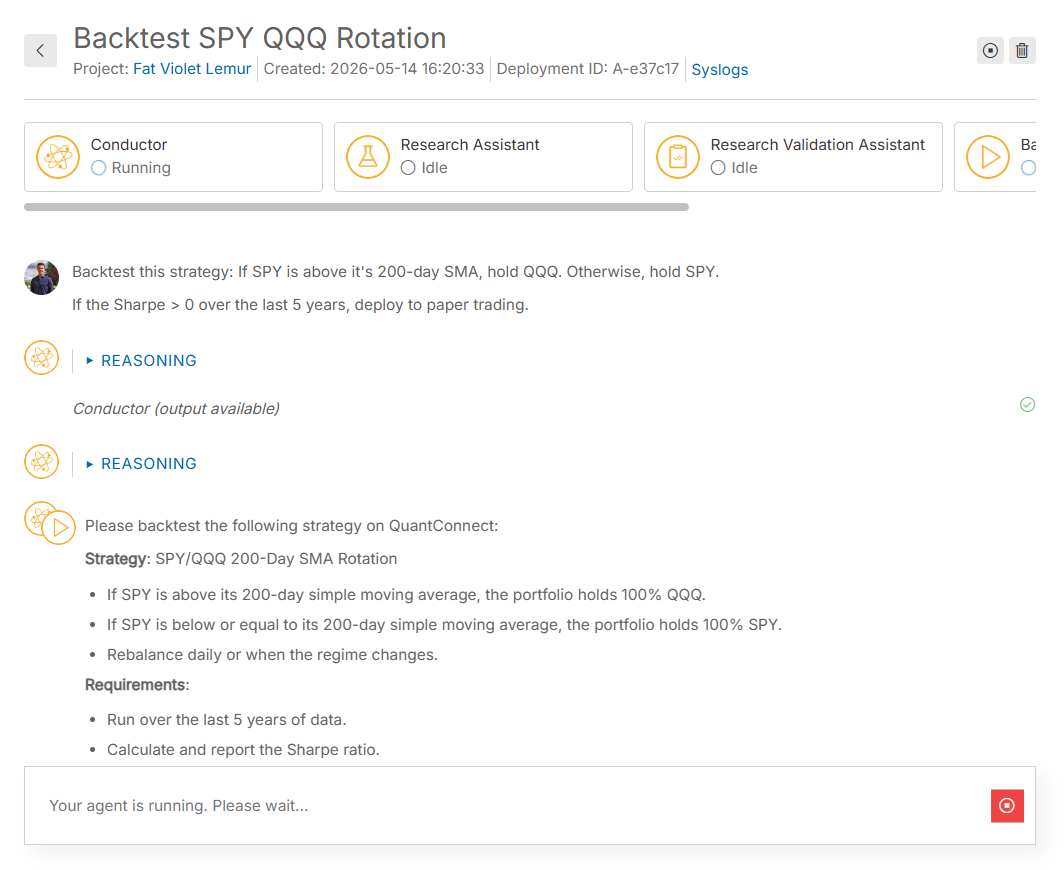
The following image shows an example of a deployment with Callable Agents (an Agent Mesh). The main page shows the conversation with the Conductor. To view the conversations of the sub-agents, click one of the agents at the top of the page. In this example, the Conductor called on the Backtest Agent to generate the algorithm, then called on the Paper Testing Agent to deploy the algorithm to paper trading once the backtest successfully completed.
You can also see our Videos. You can also get in touch with us via Discord.
Did you find this page helpful?
