Trading and Orders
Key Concepts
Introduction
LEAN has dozens of methods to create, update, and cancel orders. You can place orders automatically with helper methods or manually through methods on the algorithm API. You can fetch, update, and cancel manual orders with order tickets. As the state of your orders change, LEAN creates events that notify your algorithm.
In backtesting, LEAN simulates order fills with historical data, but you can create your own fill, fee, slippage, and margin models via plugin points. You control how optimistic or pessimistic order fills are with transaction model classes. For more information about these types of models, see Reality Modeling.
Orders and Tickets
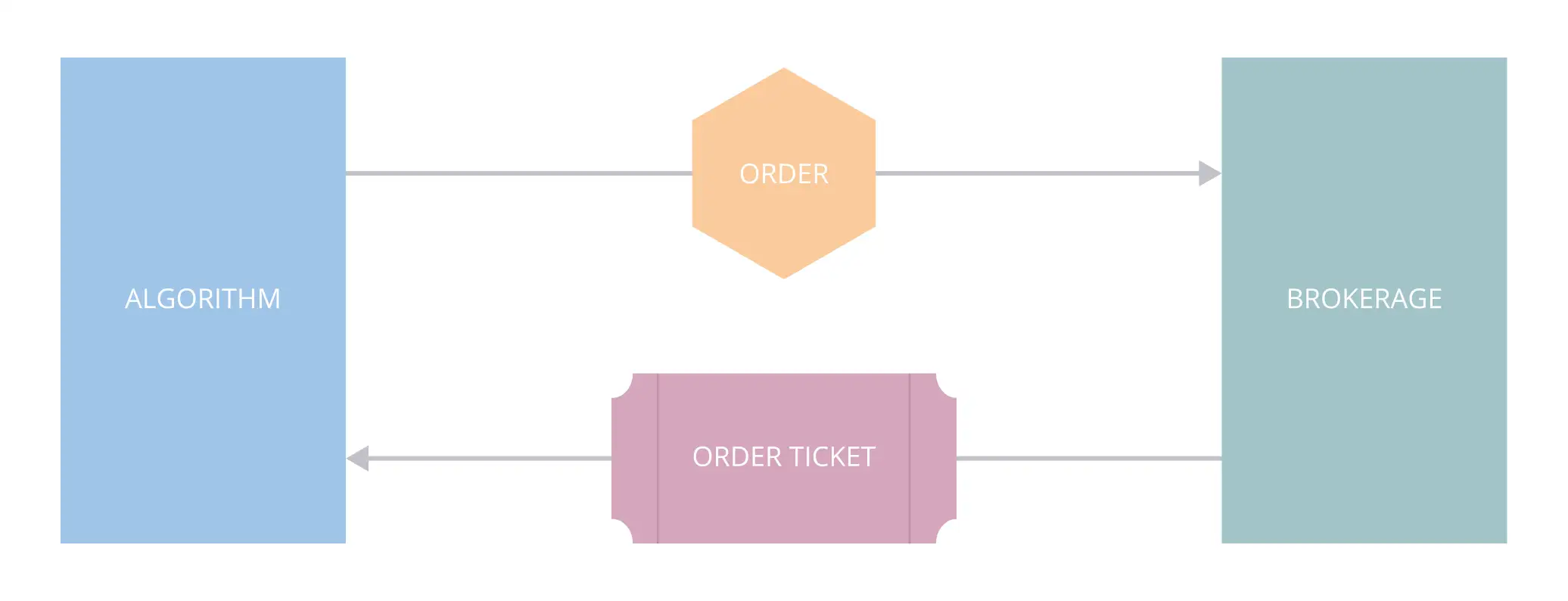
When you call one of the order methods to place an order, LEAN performs pre-order checks to ensure that the order meets some requirements and uses the last known price to check you have enough capital. To see the requirements of each order, see the Requirements section of the documentation for the order types and the Orders section of your brokerage model. If you can place the order, LEAN creates Order and OrderTicket objects. The order ticket is sent to your brokerage. As the brokerage processes your order, it returns another order ticket and it's compared against the order to see if the order is satisfied. Orders fill asynchronously in live trading, so if you want to change an order, you must request it with the order ticket. Order changes are not guaranteed since your order may fill by the time brokerage receives the request.
Symbol Properties
The SymbolPropertiessymbol_properties are a property of the Security object. LEAN uses some of the SymbolPropertiessymbol_properties to prevent invalid orders, and to calculate order quantities for a given target.
SymbolProperties objects have the following properties:
To get the SymbolPropertiessymbol_properties, use the property on the Security object.
var symbolProperties = Securities["BTCUSD"].SymbolProperties;
var lotSize = symbolProperties.LotSize;
var minimumOrderSize = symbolProperties.MinimumOrderSize;
var minimumPriceVariation = symbolProperties.MinimumPriceVariation;
symbol_properties = self.securities["BTCUSD"].symbol_properties
lot_size = symbol_properties.lot_size
minimum_order_size = symbol_properties.minimum_order_size
minimum_price_variation = symbol_properties.minimum_price_variation
LEAN uses the MinimumPriceVariationminimum_price_variation to round the LimitPricelimit_price, StopPricestop_price, and the TriggerPricetrigger_price.
Quote Currency
The quote currency is the currency you must give the seller to buy an asset. For currency trades, the quote currency is the currency ticker on the right side of the currency pair. For other types of assets, the quote currency is usually USD, but the quote currency for India Equities is INR. To get the quote currency of a Security, use the QuoteCurrencyquote_currency property.
var aaplQuoteCurrency = Securities["AAPL"].QuoteCurrency; // USD
var btcusdtQuoteCurrency = Securities["BTCUSDT"].QuoteCurrency; // USDT
aapl_quote_currency = self.securities["AAPL"].quote_currency # USD
btcusdt_quote_currency = self.securities["BTCUSDT"].quote_currency # USDT
The QuoteCurrencyquote_currency is a Cash object, which have the following properties:
You can use the ConversionRateconversion_rate property to calculate the value of the minimum price movement in the account currency
var cfd = Securities["SG30SGD"];
var quoteCurrency = cfd.QuoteCurrency; // SGD
var contractMutiplier = cfd.SymbolProperties.ContractMultiplier;
var minimumPriceVariation = cfd.SymbolProperties.MinimumPriceVariation;

// Value of a pip in account currency
var pip = minimumPriceVariation * contractMutiplier * quoteCurrency.ConversionRate;
cfd = self.securities["SG30SGD"]
quote_currency = cfd.quote_currency # SGD
contract_mutiplier = cfd.symbol_properties.contract_multiplier
minimum_price_variation = cfd.symbol_properties.minimum_price_variation

# Value of a pip in account currency
pip = minimum_price_variation * contract_mutiplier * quote_currency.conversion_rate
Trade Models
Reality models make backtests as realistic as possible to how the strategy would perform in live trading.
Open Order Margin Requirements
When an order fills, LEAN uses the portfolio information to check if you have enough capital to maintain the remaining open orders. If you don't, they are canceled.
The following table shows the order events of three orders of SPY 240109C00470000:
| Time | Id | Type | Price | Quantity | Status |
|---|---|---|---|---|---|
| 2024-01-08 09:31 | 1 | Buy Market | 0.91 | 20 | FilledFILLED |
| 2 | Sell Stop Market | 0.81 | -20 | SubmittedSUBMITTED | |
| 2024-01-08 10:31 | 3 | Sell Market | 1.50 | -10 | FilledFILLED |
| 2 | Sell Stop Market | 0.81 | -20 | InvalidINVALID |
When the sell market order fills at 10:31, LEAN checks the sell stop order and sets its status to OrderStatus.InvalidOrderStatus.INVALID due to insufficient buying power to complete it.
Asynchronous Execution
In live trading, we send your orders to the API of your brokerage and wait for their response to update the status of the order ticket from NewNEW to SubmittedSUBMITTED, CanceledCANCELED, or InvalidINVALID. When you place multiple orders, waiting for responses from the brokerage delays the last orders of the batch. To avoid this delay, you can place orders asynchronously. When you place an order asynchronously, LEAN sends the order to your brokerage and immediately continues executing your algorithm without waiting for a response. When the response from the brokerage arrives, LEAN updates the status of the order ticket accordingly, and your algorithm receives an order event.
Live Trading Considerations
In live trading, orders fill asynchronously. We send your order to the API of your brokerage and wait for their response to update the state of your algorithm and portfolio. The timing of live order fills doesn't depend on the resolution of your security subscriptions. When your order fills, the fill price and fee is set by your brokerage. You can add event handlers to your algorithm to monitor the brokerage connection and brokerage messages.
In backtesting, the trade fill timing depends on the resolution of your security subscription. For example, if you subscribe to a security with minute resolution data, the algorithm only receives data in one-minute time slices. As a result, the fill model can only evaluate if the order should fill on a minute-by-minute frequency.
You can also see our Videos. You can also get in touch with us via Discord.
Did you find this page helpful?
