Supported Indicators
Target Downside Deviation
Introduction
This indicator computes the n-period target downside deviation. The target downside deviation is defined as the root-mean-square, or RMS, of the deviations of the realized return’s underperformance from the target return where all returns above the target return are treated as underperformance of 0. Reference: https://www.cmegroup.com/education/files/rr-sortino-a-sharper-ratio.pdf
To view the implementation of this indicator, see the LEAN GitHub repository.
Using TDD Indicator
To create an automatic indicator for TargetDownsideDeviation, call the TDDtdd helper method from the QCAlgorithm class. The TDDtdd method creates a TargetDownsideDeviation object, hooks it up for automatic updates, and returns it so you can used it in your algorithm. In most cases, you should call the helper method in the Initializeinitialize method.
public class TargetDownsideDeviationAlgorithm : QCAlgorithm
{
    private Symbol _symbol;
    private TargetDownsideDeviation _tdd;

    public override void Initialize()
    {
        _symbol = AddEquity("SPY", Resolution.Daily).Symbol;
        _tdd = TDD(_symbol, 50);
    }

    public override void OnData(Slice data)
    {

        if (_tdd.IsReady)
        {
            // The current value of _tdd is represented by itself (_tdd)
            // or _tdd.Current.Value
            Plot("TargetDownsideDeviation", "tdd", _tdd);
        }
    }
}
class TargetDownsideDeviationAlgorithm(QCAlgorithm):
def initialize(self) -> None:
self._symbol = self.add_equity("SPY", Resolution.DAILY).symbol
self._tdd = self.tdd(self._symbol, 50)
def on_data(self, slice: Slice) -> None:
if self._tdd.is_ready:
# The current value of self._tdd is represented by self._tdd.current.value
self.plot("TargetDownsideDeviation", "tdd", self._tdd.current.value)For more information about this method, see the QCAlgorithm classQCAlgorithm class.
You can manually create a TargetDownsideDeviation indicator, so it doesn't automatically update. Manual indicators let you update their values with any data you choose.
Updating your indicator manually enables you to control when the indicator is updated and what data you use to update it. To manually update the indicator, call the Updateupdate method. The indicator will only be ready after you prime it with enough data.
public class TargetDownsideDeviationAlgorithm : QCAlgorithm
{
    private Symbol _symbol;
    private TargetDownsideDeviation _targetdownsidedeviation;

    public override void Initialize()
    {
        _symbol = AddEquity("SPY", Resolution.Daily).Symbol;
        _targetdownsidedeviation = new TargetDownsideDeviation(50).Of(new RateOfChange(1));
    }

    public override void OnData(Slice data)
    {
        if (data.Bars.TryGetValue(_symbol, out var bar))
            _targetdownsidedeviation.Update(bar.EndTime, bar.Close);

        if (_targetdownsidedeviation.IsReady)
        {
            // The current value of _targetdownsidedeviation is represented by itself (_targetdownsidedeviation)
            // or _targetdownsidedeviation.Current.Value
            Plot("TargetDownsideDeviation", "targetdownsidedeviation", _targetdownsidedeviation);
        }
    }
}
class TargetDownsideDeviationAlgorithm(QCAlgorithm):
def initialize(self) -> None:
self._symbol = self.add_equity("SPY", Resolution.DAILY).symbol
self._targetdownsidedeviation = IndicatorExtensions.of(TargetDownsideDeviation(50), RateOfChange(1))
def on_data(self, slice: Slice) -> None:
bar = slice.bars.get(self._symbol)
if bar:
self._targetdownsidedeviation.update(bar.end_time, bar.close)
if self._targetdownsidedeviation.is_ready:
# The current value of self._targetdownsidedeviation is represented by self._targetdownsidedeviation.current.value
self.plot("TargetDownsideDeviation", "targetdownsidedeviation", self._targetdownsidedeviation.current.value)For more information about this indicator, see its referencereference.
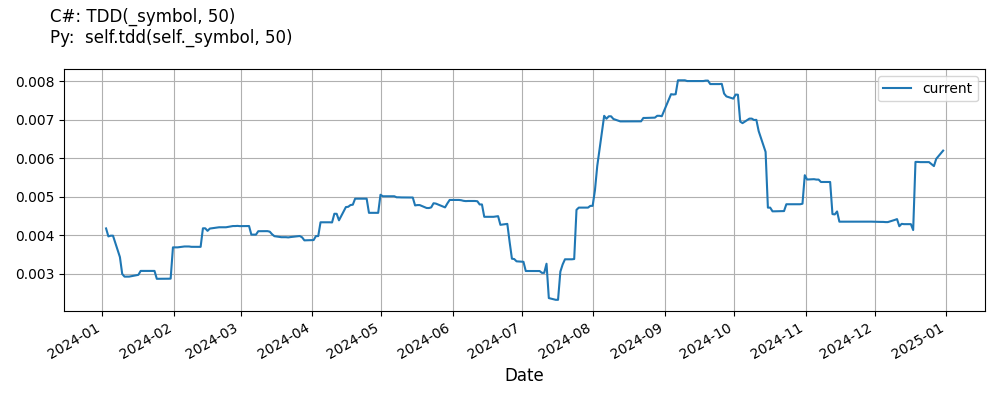
Indicator History
To get the historical data of the TargetDownsideDeviation indicator, call the IndicatorHistoryself.indicator_history method. This method resets your indicator, makes a history request, and updates the indicator with the historical data. Just like with regular history requests, the IndicatorHistoryindicator_history method supports time periods based on a trailing number of bars, a trailing period of time, or a defined period of time. If you don't provide a resolution argument, it defaults to match the resolution of the security subscription.
public class TargetDownsideDeviationAlgorithm : QCAlgorithm
{
    private Symbol _symbol;
    private TargetDownsideDeviation _tdd;

    public override void Initialize()
    {
        _symbol = AddEquity("SPY", Resolution.Daily).Symbol;
        _tdd = TDD(_symbol, 50);

        var indicatorHistory = IndicatorHistory(_tdd, _symbol, 100, Resolution.Minute);
        var timeSpanIndicatorHistory = IndicatorHistory(_tdd, _symbol, TimeSpan.FromDays(10), Resolution.Minute);
        var timePeriodIndicatorHistory = IndicatorHistory(_tdd, _symbol, new DateTime(2024, 7, 1), new DateTime(2024, 7, 5), Resolution.Minute);
    }
}
class TargetDownsideDeviationAlgorithm(QCAlgorithm):
def initialize(self) -> None:
self._symbol = self.add_equity("SPY", Resolution.DAILY).symbol
self._tdd = self.tdd(self._symbol, 50)
indicator_history = self.indicator_history(self._tdd, self._symbol, 100, Resolution.MINUTE)
timedelta_indicator_history = self.indicator_history(self._tdd, self._symbol, timedelta(days=10), Resolution.MINUTE)
time_period_indicator_history = self.indicator_history(self._tdd, self._symbol, datetime(2024, 7, 1), datetime(2024, 7, 5), Resolution.MINUTE)
You can also see our Videos. You can also get in touch with us via Discord.
Did you find this page helpful?
