Contingent Orders
Custom Contingent Orders
Introduction
To build any combination of contingent orders, create order requests with the order factory, relate them, and then submit any request of the set. For example, you can place two entry orders that cancel each other, where each entry triggers its own bracket of exit orders.
The following image shows this example when the price breaks out upward. The long entry fills, so LEAN cancels the short entry and its exit orders. The take-profit order of the long entry fills later and LEAN cancels its stop-loss order:
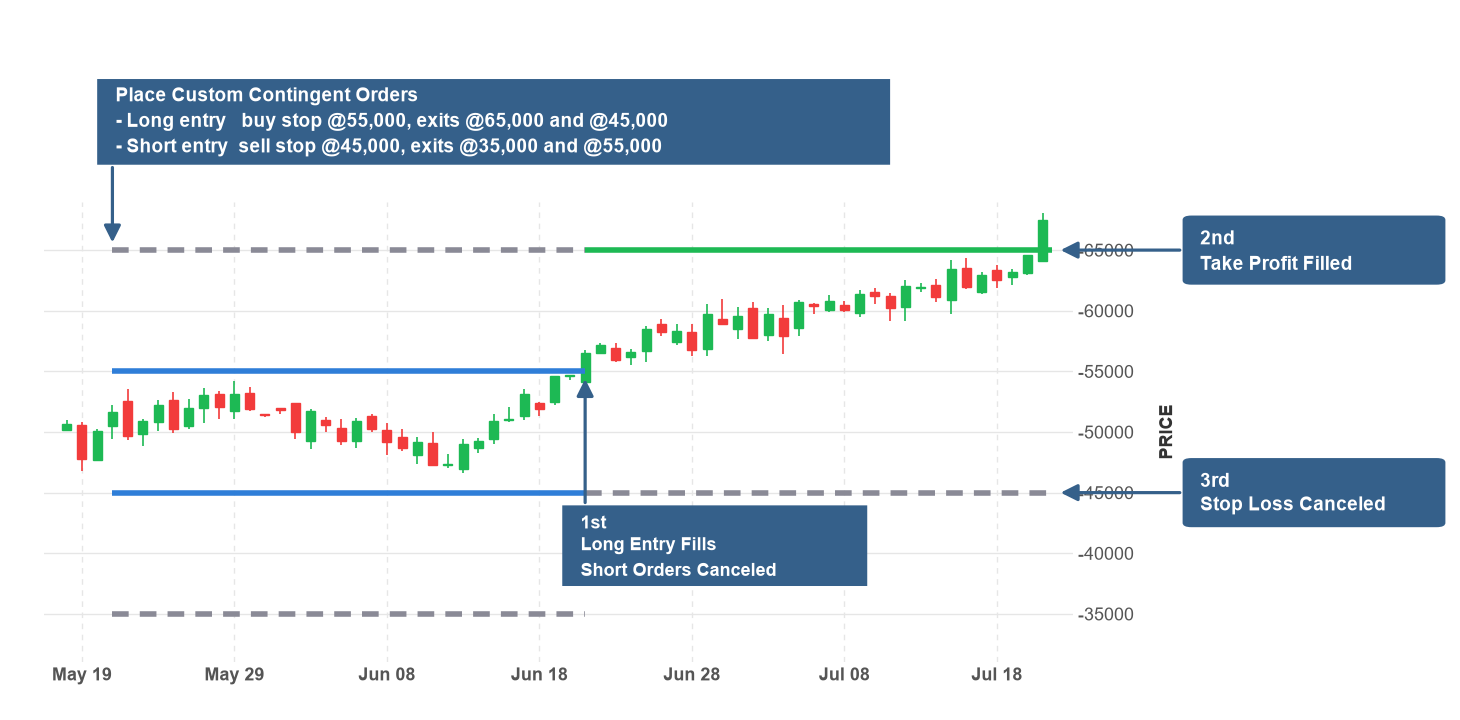
Relate Order Requests
To relate the order requests, use the following methods:
| Method | Description | Example |
|---|---|---|
request.Triggers(children)request.triggers(children) | The request triggers the child orders when it completely fills (OTO). | Place Related Orders |
request.Bracket(takeProfitPrice, stopLossPrice)request.bracket(take_profit_price, stop_loss_price) | The request triggers a take-profit order and a stop-loss order that cancel each other. | Place Related Orders |
OrderFactory.OneCancelsOther(requests)order_factory.one_cancels_other(requests) | The first fill of a request cancels the others (OCO). | Place Related Orders |
OrderFactory.OneUpdatesOther(requests)order_factory.one_updates_other(requests) | A partial fill of a request reduces the quantity of the others (OUO). | Place Related Orders |
The Triggerstriggers and Bracketbracket methods return the same request. The OneCancelsOtherone_cancels_other and OneUpdatesOtherone_updates_other methods return the list of requests. You can pass the result of one method to another to build any composition. To place the orders, pass any request of the set to the Orderorder method. The method places every order in the set and returns their order tickets, with each parent before the orders it triggers. You can add each order request to one OCO or OUO set.
// A limit entry that triggers a take profit and a stop loss that cancel each other.
var entry = OrderFactory.LimitOrder(_symbol, 100, price * 0.999m);
var takeProfit = OrderFactory.LimitOrder(_symbol, -100, price * 1.02m);
var stopLoss = OrderFactory.StopMarketOrder(_symbol, -100, price * 0.99m);
entry.Triggers(OrderFactory.OneCancelsOther(takeProfit, stopLoss));
var tickets = Order(entry);
# A limit entry that triggers a take profit and a stop loss that cancel each other.
entry = self.order_factory.limit_order(self._symbol, 100, price * 0.999)
take_profit = self.order_factory.limit_order(self._symbol, -100, price * 1.02)
stop_loss = self.order_factory.stop_market_order(self._symbol, -100, price * 0.99)
entry.triggers(self.order_factory.one_cancels_other(take_profit, stop_loss))
tickets = self.order(entry)
Combo Orders
The combo methods of the order factory return a list with one order request for each leg. LEAN treats the legs of a combo order as a single member of the set. Pass all the legs whenever you relate or submit a combo order. When a combo order is the parent of an OTO set, LEAN triggers the child orders when all the legs completely fill. To use a combo order as the parent, pass the list of legs to the OneTriggersOtherOrderone_triggers_other_order method. The Bracketbracket method doesn't support combo orders.
// Buy a butterfly spread and sell it when its net price reaches the take-profit level.
var legs = new List<Leg>
{
    Leg.Create(calls[0].Symbol, 1),
    Leg.Create(calls[1].Symbol, -2),
    Leg.Create(calls[2].Symbol, 1)
};
var entry = OrderFactory.ComboMarketOrder(legs, 2);
var takeProfit = OrderFactory.ComboLimitOrder(legs, -2, takeProfitPrice);
var tickets = OneTriggersOtherOrder(entry, takeProfit);
# Buy a butterfly spread and sell it when its net price reaches the take-profit level.
legs = [
Leg.create(calls[0].symbol, 1),
Leg.create(calls[1].symbol, -2),
Leg.create(calls[2].symbol, 1)
]
entry = self.order_factory.combo_market_order(legs, 2)
take_profit = self.order_factory.combo_limit_order(legs, -2, take_profit_price)
tickets = self.one_triggers_other_order(entry, take_profit)
Brokerage Support
Each brokerage has a set of assets and order types they support. To avoid issues with contingent orders, set the brokerage model to a brokerage that supports them.
SetBrokerageModel(BrokerageName.QuantConnectBrokerage);
self.set_brokerage_model(BrokerageName.QUANTCONNECT_BROKERAGE)
To check if your brokerage has any special requirements for contingent orders, see the Orders section of the brokerage model documentation.
The following brokerages support contingent orders:
Brokerages that support contingent orders can limit the contingency types, the number of orders in a set, the securities in a set, combo order members, and chains. If the brokerage model doesn't support a set of contingent orders, LEAN invalidates every order in the set.
Examples
The following examples demonstrate common practices for using custom contingent orders.
Example 1: Inside Day Breakout
The following algorithm trades a breakout after an inside day, which is a day with a range inside the range of the day before. It places a buy stop order at the high and a sell stop order at the low. The two entry orders cancel each other. Each entry triggers its own bracket order. The take profit is one range away and the stop loss is at the opposite side of the range.
public class CustomContingentOrdersExampleAlgorithm : QCAlgorithm
{
    private Symbol _spy;
    private RollingWindow<TradeBar> _bars = new(2);

    public override void Initialize()
    {
        SetStartDate(2024, 1, 1);
        SetEndDate(2024, 12, 31);
        _spy = AddEquity("SPY", Resolution.Daily).Symbol;
    }

    public override void OnData(Slice slice)
    {
        if (!slice.Bars.TryGetValue(_spy, out var bar))
        {
            return;
        }
        _bars.Add(bar);
        if (!_bars.IsReady || Portfolio.Invested || Transactions.GetOpenOrders(_spy).Count > 0)
        {
            return;
        }
        var (today, yesterday) = (_bars[0], _bars[1]);
        if (today.High >= yesterday.High || today.Low <= yesterday.Low)
        {
            return;
        }
        var range = today.High - today.Low;
        var breakoutUp = OrderFactory.StopMarketOrder(_spy, 100, today.High).Bracket(today.High + range, today.Low);
        var breakoutDown = OrderFactory.StopMarketOrder(_spy, -100, today.Low).Bracket(today.Low - range, today.High);
        Order(OrderFactory.OneCancelsOther(breakoutUp, breakoutDown));
    }
}
class CustomContingentOrdersExampleAlgorithm(QCAlgorithm):
def initialize(self) -> None:
self.set_start_date(2024, 1, 1)
self.set_end_date(2024, 12, 31)
self._spy = self.add_equity("SPY", Resolution.DAILY).symbol
self._bars = RollingWindow[TradeBar](2)
def on_data(self, slice: Slice) -> None:
bar = slice.bars.get(self._spy)
if not bar:
return
self._bars.add(bar)
if not self._bars.is_ready or self.portfolio.invested or self.transactions.get_open_orders(self._spy):
return
today, yesterday = self._bars[0], self._bars[1]
if today.high >= yesterday.high or today.low <= yesterday.low:
return
range_ = today.high - today.low
breakout_up = self.order_factory.stop_market_order(self._spy, 100, today.high).bracket(today.high + range_, today.low)
breakout_down = self.order_factory.stop_market_order(self._spy, -100, today.low).bracket(today.low - range_, today.high)
self.order(self.order_factory.one_cancels_other(breakout_up, breakout_down))
You can also see our Videos. You can also get in touch with us via Discord.
Did you find this page helpful?
