Contingent Orders
One Triggers Other Orders
Place Orders
To place a set of OTO orders, create the parent and child order requests with the order factory and pass them to the OneTriggersOtherOrderone_triggers_other_order method. The brokerage holds the child orders until the parent order completely fills. If the parent order is canceled or invalid, LEAN cancels the child orders, even if the parent partially filled. The method returns a list with the order ticket of each order, starting with the parent.
// Buy IBM and BAC after the SPY entry fills.
var parent = OrderFactory.LimitOrder(_spy, 100, limitPrice);
var tickets = OneTriggersOtherOrder(parent, new List<SubmitOrderRequest>
{
    OrderFactory.MarketOrder(_ibm, 10),
    OrderFactory.MarketOrder(_bac, 20)
});
# Buy IBM and BAC after the SPY entry fills.
parent = self.order_factory.limit_order(self._spy, 100, limit_price)
tickets = self.one_triggers_other_order(parent, [
self.order_factory.market_order(self._ibm, 10),
self.order_factory.market_order(self._bac, 20)
])
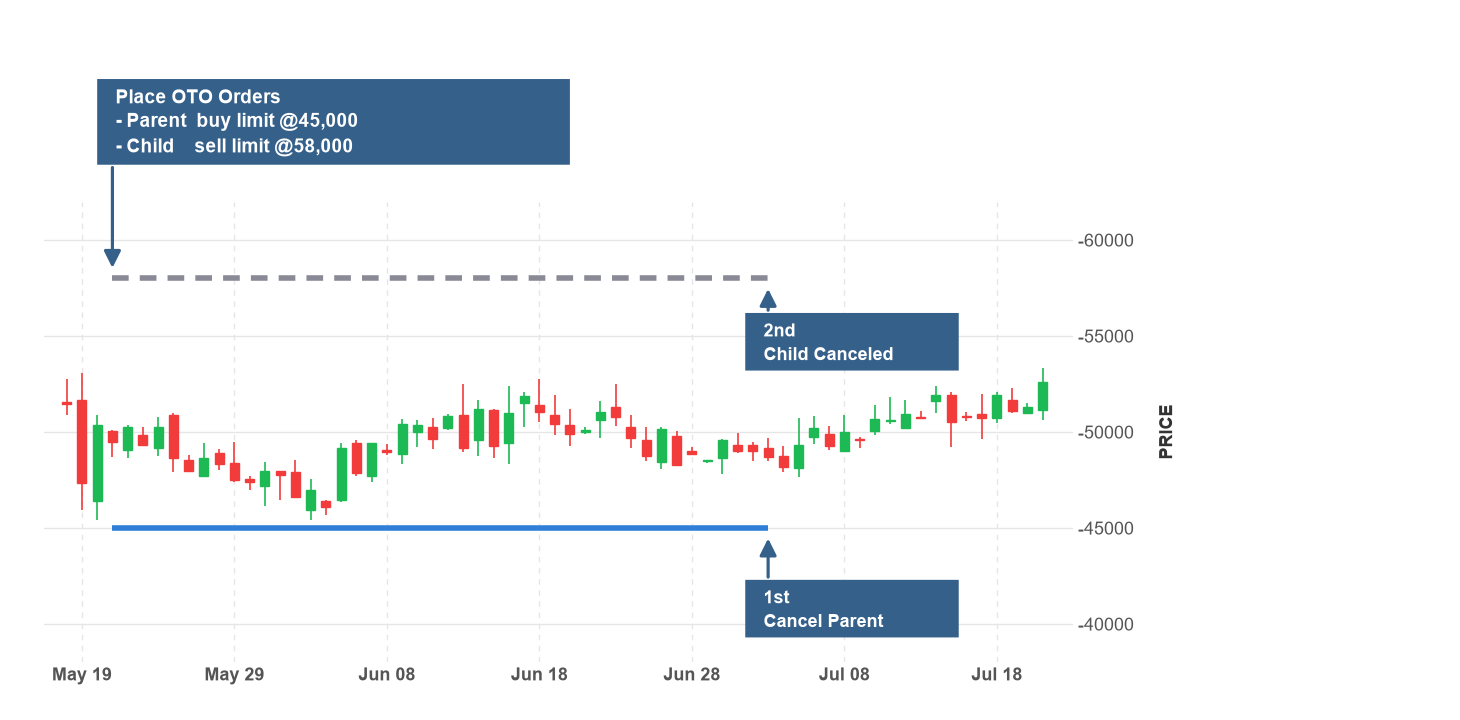
The following images show the two outcomes of an OTO set. In the first image, the parent order fills and triggers the child order, which fills later:
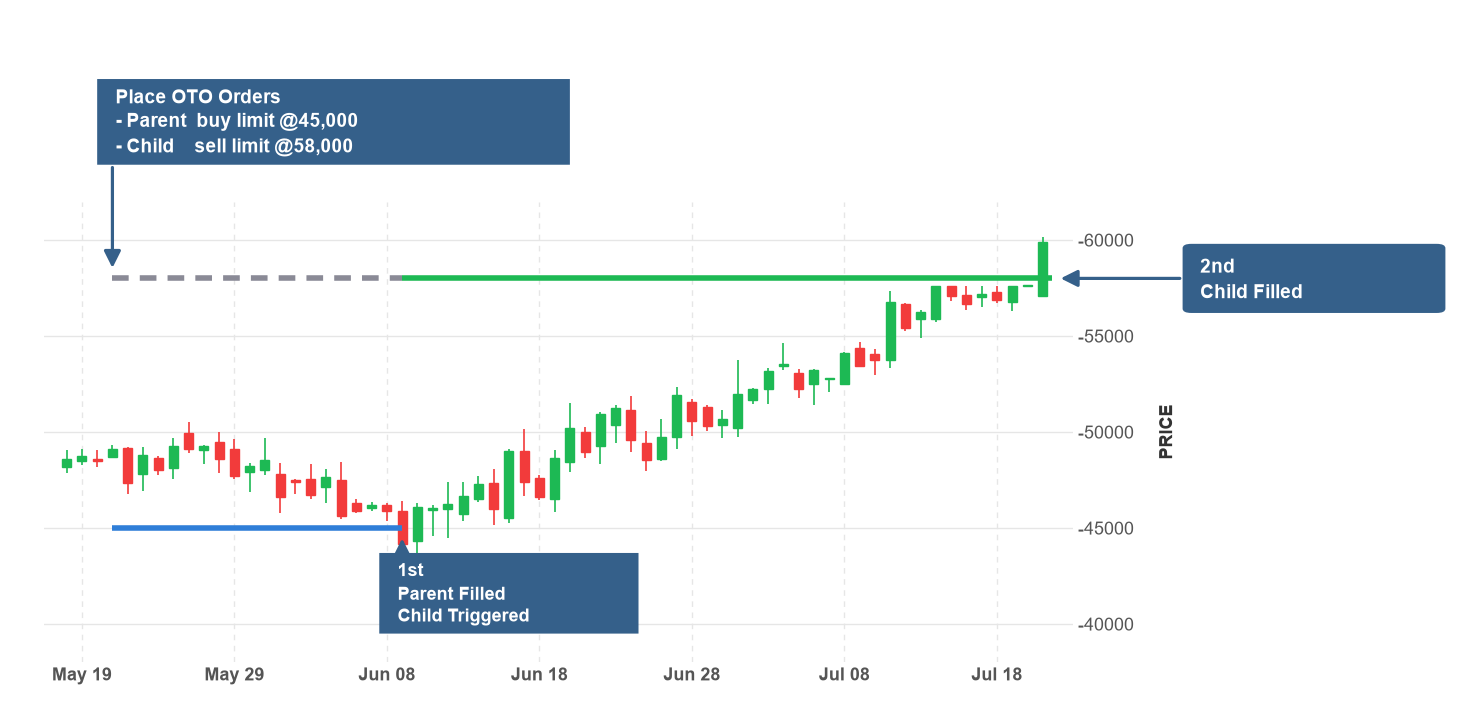
In the second image, you cancel the parent order before it fills, so LEAN cancels the child order:
Place Related Orders
The child orders are independent of each other and can be for different securities. To relate the child orders, pass them through the OrderFactory.OneCancelsOtherorder_factory.one_cancels_other or OrderFactory.OneUpdatesOtherorder_factory.one_updates_other method first, as described in Custom Contingent Orders. A child order can trigger its own child orders, which are grandchild orders of the parent. To create a chain, call the Triggerstriggers method on the child order request.
// The IBM order triggers the BAC order once it fills.
var child = OrderFactory.MarketOrder(_ibm, 10).Triggers(OrderFactory.MarketOrder(_bac, 20));
var tickets = OneTriggersOtherOrder(parent, new List<SubmitOrderRequest> { child });
# The IBM order triggers the BAC order once it fills. child = self.order_factory.market_order(self._ibm, 10).triggers(self.order_factory.market_order(self._bac, 20)) tickets = self.one_triggers_other_order(parent, [child])
The brokerage holds the grandchild order until the child order completely fills. The method returns the order tickets in the order parent, child, and grandchild, with each parent before the orders it triggers. If you cancel the parent, LEAN cancels the child and the grandchild.
Monitor Orders
Each order in the set has its own order ticket, which fills and closes independently. To get the relationships of an order, use the Contingencycontingency property of the order ticket. A child order that waits for its parent to fill has the OrderStatus.SubmittedOrderStatus.SUBMITTED status. To check if the brokerage still holds the order, use the IsWaitingForTriggeris_waiting_for_trigger property of the contingency.
foreach (var ticket in tickets)
{
    Debug($"{ticket.OrderId} held: {ticket.Contingency.IsWaitingForTrigger}; Quantity filled: {ticket.QuantityFilled}");
}
for ticket in tickets:
self.debug(f"{ticket.order_id} held: {ticket.contingency.is_waiting_for_trigger}; Quantity filled: {ticket.quantity_filled}")
The Contingencycontingency property is an OrderContingency object, which has the following attributes:
The Linkslinks property holds a ContingencyLink object for each relationship of the order, which has the following attributes:
The GetOpenOrdersRemainingQuantityget_open_orders_remaining_quantity method of the transaction manager excludes the orders that wait for their parent to fill.
Update Orders
You can update any open order in the set, including a child order that waits for its parent to fill. To update an order, pass an UpdateOrderFields object to the Updateupdate method on the OrderTicket, or call one of its update methods. An update doesn't release a held order. If you give a held limit order a marketable price, the order fills only after its parent fills.
// Move the parent limit price.
var response = tickets[0].UpdateLimitPrice(price * 0.995m, "Updated parent limit price");
if (response.IsSuccess)
{
    Debug("Order updated successfully");
}
# Move the parent limit price.
response = tickets[0].update_limit_price(price * 0.995, "Updated parent limit price")
if response.is_success:
self.debug("Order updated successfully")
Some brokerages don't support updates to contingent orders or to their quantity. To change these orders, cancel the set and place it again.
Cancel Orders
To cancel an order in the set, call the Cancelcancel method on the OrderTicket. LEAN also cancels the orders that depend on it. If you cancel a parent order, LEAN cancels the orders it triggers and the orders they trigger in turn.
// Cancel the parent, which also cancels the child orders.
var response = tickets[0].Cancel("Cancel parent, which also cancels the child orders");
if (response.IsSuccess)
{
    Debug("Order successfully cancelled");
}
# Cancel the parent, which also cancels the child orders.
response = tickets[0].cancel("Cancel parent, which also cancels the child orders")
if response.is_success:
self.debug("Order successfully cancelled")
The message of the cancel order event of each dependent order names the order that caused the cancellation.
Backtest Fills
In backtests, LEAN simulates how the brokerage manages the set with the following rules:
- When a parent order fills, LEAN triggers the child orders at the fill time. Triggered market orders fill right away. Other triggered orders require new data before they can fill, so they don't fill with prices from before the trigger.
- A triggered trailing stop order sets its initial stop price from the market price at the trigger time.
- LEAN measures the day time in force of a child order from the time its parent fills.
For more information about how LEAN models order fills in backtests, see Trade Fills.
Buying Power
When you place a set of contingent orders, LEAN checks the buying power of the orders that start working right away. LEAN checks the buying power of a child order when its parent fills, so you can place child orders larger than your current buying power.
Brokerage Support
Each brokerage has a set of assets and order types they support. To avoid issues with contingent orders, set the brokerage model to a brokerage that supports them.
SetBrokerageModel(BrokerageName.QuantConnectBrokerage);
self.set_brokerage_model(BrokerageName.QUANTCONNECT_BROKERAGE)
To check if your brokerage has any special requirements for contingent orders, see the Orders section of the brokerage model documentation.
The following brokerages support contingent orders:
Brokerages that support contingent orders can limit the contingency types, the number of orders in a set, the securities in a set, combo order members, and chains. If the brokerage model doesn't support a set of contingent orders, LEAN invalidates every order in the set.
Examples
The following examples demonstrate common practices for using one triggers other orders.
Example 1: Trail the Exit After a Limit Entry
The following algorithm places a limit order to buy SPY 1% below the close price when it has no position. The limit order triggers a trailing stop order that sells the position. The trailing stop order starts to trail when the entry fills, so its initial stop price is 3% below the price at that time.
public class OneTriggersOtherExampleAlgorithm : QCAlgorithm
{
    private Symbol _spy;

    public override void Initialize()
    {
        SetStartDate(2024, 1, 1);
        SetEndDate(2024, 12, 31);
        _spy = AddEquity("SPY", Resolution.Daily).Symbol;
    }

    public override void OnData(Slice slice)
    {
        if (Portfolio.Invested || Transactions.GetOpenOrders(_spy).Count > 0 || !slice.Bars.TryGetValue(_spy, out var bar))
        {
            return;
        }
        var entry = OrderFactory.LimitOrder(_spy, 100, Math.Round(bar.Close * 0.99m, 2));
        OneTriggersOtherOrder(entry, new List<SubmitOrderRequest>
        {
            OrderFactory.TrailingStopOrder(_spy, -100, 0.03m, true)
        });
    }
}
class OneTriggersOtherExampleAlgorithm(QCAlgorithm):
def initialize(self) -> None:
self.set_start_date(2024, 1, 1)
self.set_end_date(2024, 12, 31)
self._spy = self.add_equity("SPY", Resolution.DAILY).symbol
def on_data(self, slice: Slice) -> None:
bar = slice.bars.get(self._spy)
if self.portfolio.invested or self.transactions.get_open_orders(self._spy) or not bar:
return
entry = self.order_factory.limit_order(self._spy, 100, round(bar.close * 0.99, 2))
self.one_triggers_other_order(entry, [
self.order_factory.trailing_stop_order(self._spy, -100, 0.03, True)
])
Example 2: Enter, Take Profit, and Re-Enter
The following algorithm trades SPY in a price range with a chain of three orders. The parent buys SPY 1% below the close price. When the parent fills, its child sells the position 1% above the close price. When the child fills, the grandchild buys SPY again at the entry price. While the algorithm holds the position of the grandchild, it places a new take-profit order.
public class OneTriggersOtherChainExampleAlgorithm : QCAlgorithm
{
    private Symbol _spy;

    public override void Initialize()
    {
        SetStartDate(2024, 1, 1);
        SetEndDate(2024, 12, 31);
        _spy = AddEquity("SPY", Resolution.Daily).Symbol;
    }

    public override void OnData(Slice slice)
    {
        if (Transactions.GetOpenOrders(_spy).Count > 0 || !slice.Bars.TryGetValue(_spy, out var bar))
        {
            return;
        }
        var entryPrice = Math.Round(bar.Close * 0.99m, 2);
        var exitPrice = Math.Round(bar.Close * 1.01m, 2);
        if (Portfolio[_spy].Invested)
        {
            LimitOrder(_spy, -Portfolio[_spy].Quantity, exitPrice);
            return;
        }
        // The take profit triggers the re-entry, which is a grandchild of the entry.
        var takeProfit = OrderFactory.LimitOrder(_spy, -100, exitPrice).Triggers(OrderFactory.LimitOrder(_spy, 100, entryPrice));
        OneTriggersOtherOrder(OrderFactory.LimitOrder(_spy, 100, entryPrice), new List<SubmitOrderRequest> { takeProfit });
    }
}
class OneTriggersOtherChainExampleAlgorithm(QCAlgorithm):
def initialize(self) -> None:
self.set_start_date(2024, 1, 1)
self.set_end_date(2024, 12, 31)
self._spy = self.add_equity("SPY", Resolution.DAILY).symbol
def on_data(self, slice: Slice) -> None:
bar = slice.bars.get(self._spy)
if self.transactions.get_open_orders(self._spy) or not bar:
return
entry_price = round(bar.close * 0.99, 2)
exit_price = round(bar.close * 1.01, 2)
if self.portfolio[self._spy].invested:
self.limit_order(self._spy, -self.portfolio[self._spy].quantity, exit_price)
return
# The take profit triggers the re-entry, which is a grandchild of the entry.
take_profit = self.order_factory.limit_order(self._spy, -100, exit_price).triggers(
self.order_factory.limit_order(self._spy, 100, entry_price))
self.one_triggers_other_order(self.order_factory.limit_order(self._spy, 100, entry_price), [take_profit])
You can also see our Videos. You can also get in touch with us via Discord.
Did you find this page helpful?
